plantuml
This page will be for sample plantuml diagrams.
I’ve grown up with graphviz and plantuml.
Mermaid is really simple to integrate, but I’ve grown used to the features in plantuml and I just can’t give them up !
I’m trying to render with:
kramdown plantuml
which lets you adds a plugin to _config.yml:
plugins:
  - "kramdown-plantuml"
Which should work at least within a github page.
Let’s give it a try.
sample diagrams
embedding code like:
> ```plantuml
> @startuml Diagram
> actor client
> node app
> database db
> db -> app
> app -> client
> @enduml
> ```
@startuml Diagram
actor client
node app
database db
db -> app
app -> client
@enduml
If that doesn’t work, i can put diagrams inside a <div hidden> tag with the suggestion from: noamtamim
> <div hidden>
> ```plantuml
> @startuml firstDiagram
>
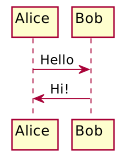
> Alice -> Bob: Hello
> Bob -> Alice: Hi!
>
> @enduml
> ```
> </div>
> and display the image with:
> 
and manually run:
plantuml -output ../assets/images -Tsvg _posts/*
or from windows:
java -jar c:/utils/plantuml.jar -output ../assets/images -Tsvg _posts/*
test locally with:
bundle exec jekyll serve
and launching a browser to http://127.0.0.1:4000/

Unfortunately vscode markdown preview will not render the content inside <div hidden> so editing the content is annoying and I change <div hidden> to <div hidden></div> while working with markdown preview.